I’ve been running OpenClaw as my daily AI agent for a while. The browser ended up being the thing I had to fix.
For weeks, my OpenClaw kept giving me mediocre results on deep research tasks and I couldn’t figure out why. Everything looked fine until I started checking the sources. Turns out it was getting blocked by almost every major site, even with my accounts logged in, and quietly falling back to much worse sources or just hallucinating.
Blaming the wrong things
My setup should have looked human: a spare MacBook Pro on my home network, logged-in accounts, nothing unusual. But almost anything with bot detection blocked it. Google and Bing threw CAPTCHAs, X kept showing login walls, and Medium wouldn’t even load past Cloudflare. I tried different browser MCPs, a bunch of browser CLIs, and configuration tweaks. Nothing helped.
I also tried switching networks and VPNs. Still nothing. That was the annoying part. I had spent weeks swapping pieces around, but the browser itself was still showing up as automation.
The CDP problem
So I went down the rabbit hole of how bot detection actually works.
OpenClaw’s built-in browser uses Chromium with Playwright. Tools like Puppeteer and Playwright use Chrome DevTools Protocol (CDP) to control the browser. When they connect, a Runtime.Enable command fires, which a few lines of JavaScript can detect. Both Cloudflare and DataDome check for it. IP and cookies still matter, but in my case they weren’t the thing giving me away.
CDP was only one of the leaks. Automation libraries also inject JavaScript into pages to work (window.__playwright__binding__ and similar). Anti-bot scripts catch these by checking property descriptors and function signatures. If toString() on a browser function no longer returns "[native code]", something has been tampered with. That’s enough to flag you.
And then there’s fingerprinting
Then there’s hardware fingerprinting, which I honestly hadn’t thought about at all. Your browser exposes hundreds of data points about the machine it’s running on, things like GPU model via WebGL, pixel-level Canvas output, screen resolution, even audio processing. A real machine’s fingerprint values fit together in a way that’s hard to fake. Automated browsers usually slip up somewhere. The Canvas output can be identical across thousands of sessions, or the user agent says Windows but the GPU says Apple. Any mismatch like that and the request gets flagged.
I hadn’t even considered this one. I’d been focused on cookies and headers while the actual problem was somewhere I hadn’t looked.
What finally worked
Most anti-detection tools try to fix this at the JavaScript level, overriding navigator.webdriver or faking Canvas output. A lot of bot detection can see through the common tricks.
After trying a few things I ended up on Camoufox, which is a Firefox fork. The reason it works where Chromium-based tools didn’t (for me at least) is that it skips CDP and patches fingerprint values down in the C++ layer, so the page can’t tell the values were spoofed.
Camoufox was painful to use directly
Camoufox fixed the browser side. Using it from an agent was the next problem. Camoufox only has a Python SDK, so every browser action required the agent to write a throwaway Python script, figure out the right method signatures, handle async contexts, and parse the results. Each page visit burned tokens just on boilerplate. The agent spent more time on Camoufox glue code than on the actual research.
Wrapping it
The reason I bothered wrapping Camoufox, instead of going back to Playwright with more patches, was that the browser part finally seemed right. The annoying part was making it usable by an agent.
So I wrapped it in a CLI. The agent calls shell commands instead of writing throwaway Python, and a daemon keeps the browser alive so it doesn’t pay startup cost every page.
I also added a feature inspired by agent-browser: returning accessibility snapshots instead of raw HTML. Most pages I was hitting were way cheaper this way. I haven’t benchmarked it carefully, but the number people usually cite for this snapshot + refs approach is roughly 93% less context-token usage than Playwright MCP.
Once OpenClaw was running through the CLI, the obvious failures mostly stopped. Searches went through, Medium wasn’t blank anymore, and X stopped throwing login walls at me on every visit.
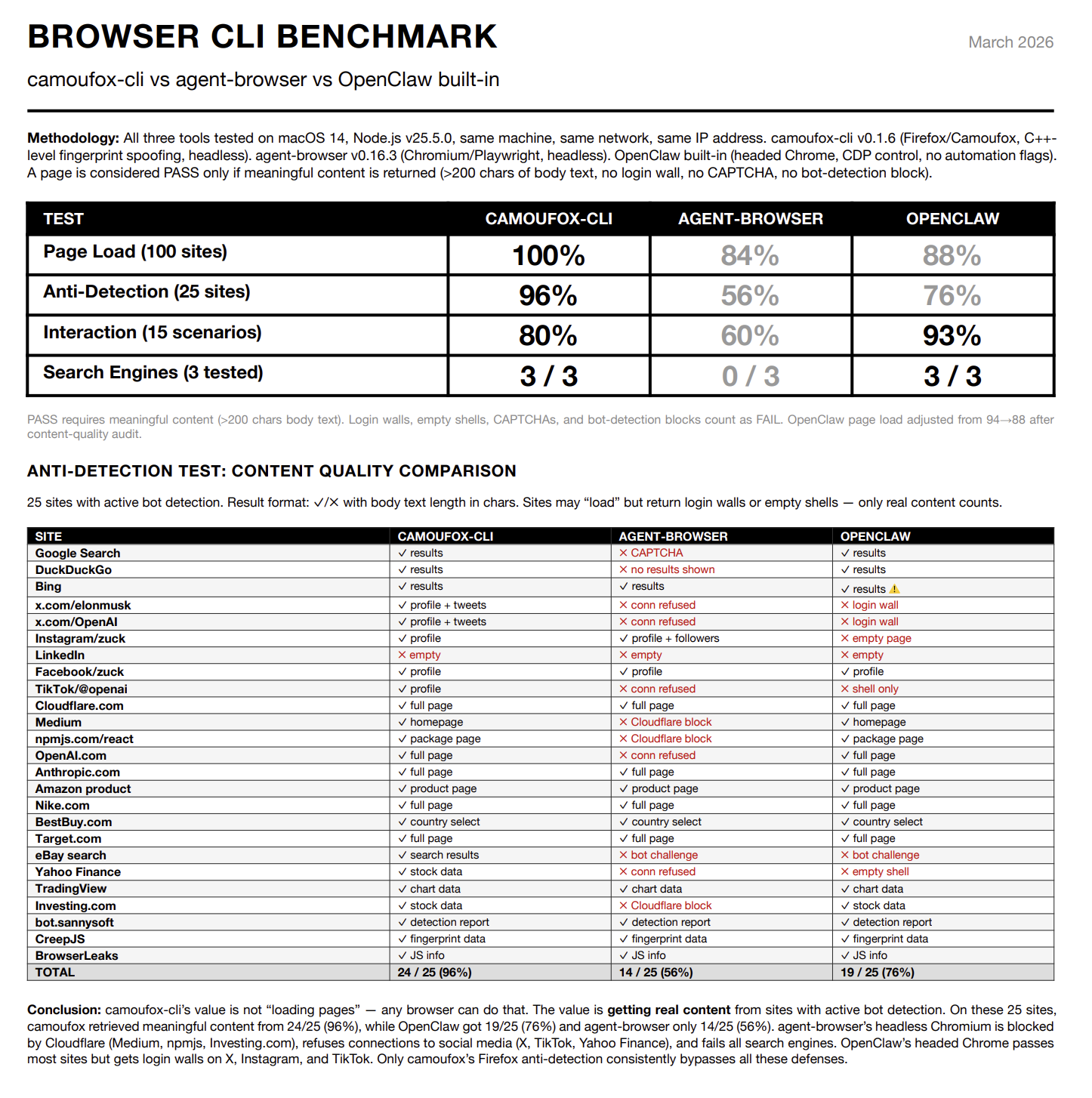
This doesn’t make bot detection disappear. It just removed the dumb failures I was hitting every day.
It’s been running for a few weeks and I’ve mostly stopped thinking about the browser layer, which is what I wanted. The agent reaches the sources I expected it to in the first place.
I put the CLI, skills, and source code here: camoufox-cli. If your agent keeps getting stuck on CAPTCHAs or empty login walls, it might save you some time.